
Instrument Expert
Original factory packaging

Service Hotline:
(+86)010-52867771
Instrument Expert
Original factory packaging
Service Hotline:
(+86)010-52867771
Updated:2025-03-13
Views:2707
 WeChat
 QQ
QQ
 Online Service
 User's Manual
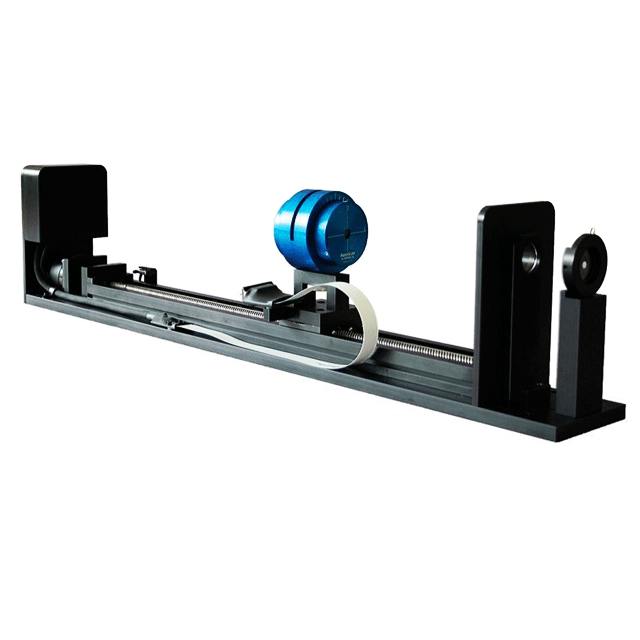
Scanhead Travel: 500mm
USB 2.0Interface
M2 Analysis Software included
| Wavelengths | See Scanhead Specs |
| Interface | USB 2.0 |
| Sensor Type | Silicon, Germanium or Pyroelectric |
| Active Area | See Scanhead Specs |
| Compliance | CE, UKCA, China RoHS |
When in the laser life cycle is the M2 measurement the most important?M2 measurement is important if the stability of your laser is important to your process. Taking M2 measurements on a frequent basis allows you to see if your laser is stable from time to time. If the results of the M2 measurement fluctuate and a noticeable change happens over time, this could help identify problems with consistency in the laser and help prevent negative results to your process where the laser is being utilized.
Why doesn’t the NanoModeScan “ModeScan Configuration” program remember the COM setting?It has been observed that on networked computers with security, that in order to keep the COM setting in the NanoModeScan “ModeScan Configuration” program persistent, it needs to be launched with a right-mouse-key-click and select “Run as administrator” in order for it to work OK.
Can you change the rotation frequency of the NanoModeScan?You can change the rotation frequency of the NanoModeScan. You can choose any of the speeds available in the NanoScan software in the NanoModeScan software. As a default, the NanoModeScan starts at the 20 Hz rate.
Why does my profile work well while running the NanoScan software but the profile diminishes in the NanoModeScan software?The NanoScan software starts at a rotation frequency of 10 Hz while the NanoModeScan starts at a rotation frequency of 20 Hz. At the frequency of 20 Hz, less signal is getting to the detector because of the speed of the slit passing over the detector. This makes it look like you are not getting as strong of signal. The NanoModeScan starts at this higher rotation frequency because the NanoScan is meant to pass through the focus of the beam, making the power or energy density higher. This higher power or energy density can over-saturate the NanoScan at 10 Hz.
Can the NanoModeScan software export 2D/3D images?The 2D and 3D profiles are NOT exportable.The NanoScan and NanoModeScan's 2D and 3D images are not actual 2D and 3D profiles of the beam. They are mathematically generated profiles calculated from the 1D profile information. Thus they are not completely accurate profiles.
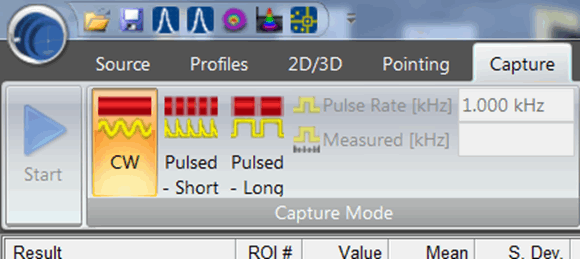
Can a NanoModeScan unit be triggered to capture a pulsed source?The NanoScan can capture a high repitition rate pulsed laser source but it can not be triggered from the laser itself. To capture a pulsed source on the NanoScan you must choose one of the pulsed settings under the Capture tab. The laser pulse rate must also be greater than 100 kHz.
Why can my M2 unit have an M2 measurement less than 1?There are two common occurrences when M2 results are less than 1. The first and most common of these results from the operator entering the wrong wavelength value. In this case the results are often well below 1, in the .8-.9 range. The second most common cause is due to nominal accuracy tolerances. These are normal and expected. With a 5% M2 tolerance results from ~.95 to ~1.05 are possible. Averaging runs will normally return a mean value to something > 1, but not always.
It has been suggested that if the M2 results are computed to be < 1 we should display a 1 as the answer. However the algorithms in the NanoModeScan software make computations and report results as the input settings and the beam samples dictate. This is done to provide useful information to the operator rather than to try and conceal the issue.
I’ve acquired a NanoModeScan system and I’m trying to operate it on a Windows 10 computer, but it is not working. Why not?The NanoModeScan systems are not compatible with Windows 10. The software has not been updated yet to support Windows 10. The NanoScan that came with it, though, is supported on Windows 10 64-bit through the NanoScan V2 software. The connection to move the scan head down the rail does not work with Windows 10 yet.
What wavelength can the NanoModeScan measure?The wavelengths that can be measured with the NanoModeScan are limited by the NanoScan detector that is used.
The Silicon NanoScan’s can measure wavelengths from 190 – 1,100nm
The Germanium NanoScan’s can measure wavelengths from 700 – 1,800nm
The Pyroelectric NanoScan’s can measure wavelengths from 190 – 20,000nm
Does the NanoModeScan operate with Windows 10?Users may find that the NanoScan v2 application and the provided USB to RS-232 serial converters are Windows 10 compatible, however, currently the NanoModeScan application is not compatible with the Windows 10 operating system.
Customer Service QQ
Customer Hotline:
Technical Supports


 3003988120
 yiqi.com
 bio-equip.com
 b2bwork.baidu.com
 baidu.com